
That is exactly why this free Concrete Calculator exists. It is a 5-in-1 professional-grade tool that helps you calculate the exact volume of concrete needed for any shape, any project, any unit system — in seconds.
No complicated math. No guesswork. Just accurate results.
What Is a Concrete Calculator and Why Do You Need One?
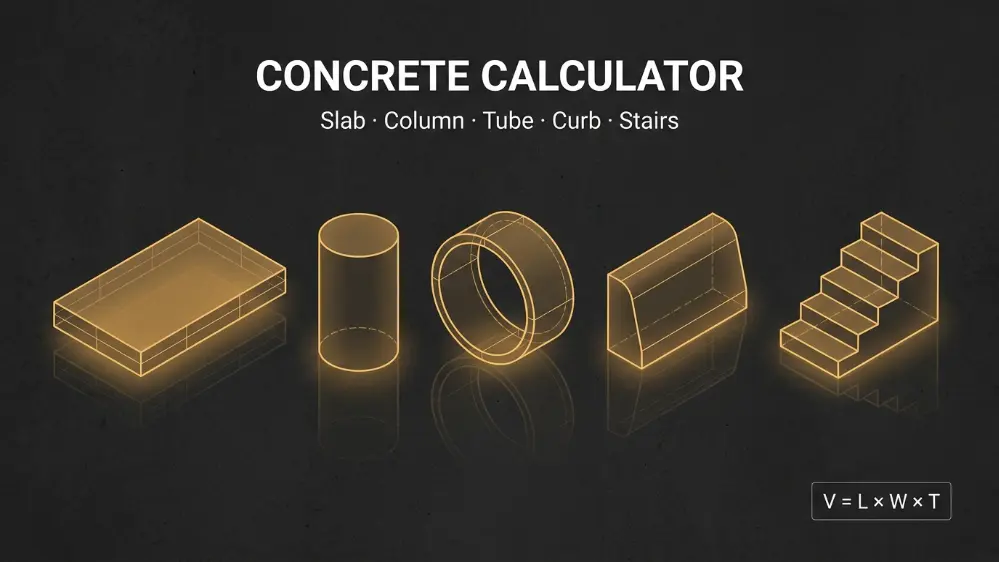
A concrete calculator is a digital tool that estimates the volume of concrete required for a specific structure — whether that is a rectangular slab, a cylindrical column, a ring footing, a roadside curb, or a set of stairs.
In construction, concrete volume is measured in cubic yards (US standard) or cubic meters (metric). Once you know the volume, you can determine how many premixed bags of concrete to buy — such as 60lb or 80lb bags — or how many cubic yards to order from a ready-mix supplier.
The formula sounds simple, but in practice, each structure has a different shape. A column is a cylinder. Stairs are a series of layered rectangles. A tube footing is a hollow cylinder. Each one requires a different formula, and even a small miscalculation in dimensions compounds quickly into a significant material error.
This tool solves all of that instantly.
Which Concrete Calculator Should You Use?
This tool includes five specialized calculators. Here is a quick guide to help you pick the right one:
- Slabs, Square Footings, or Walls — Use this for any flat, rectangular pour. This covers house foundations, driveway slabs, garden patios, sidewalks, retaining walls, and floor slabs. You enter the length, width, and thickness, and the calculator returns the volume instantly.
- Hole, Column, or Round Footings — Use this for cylindrical concrete structures. If you are setting fence posts, pouring Sonotube footings, building structural pillars, or filling post holes, this is your calculator. It uses the diameter and height of the cylinder.
- Circular Slab or Tube — This one handles hollow cylinders and ring-shaped pours — think well rings, culvert surrounds, pipe encasements, or donut-shaped decorative slabs. You enter the outer diameter, inner diameter, and height to get the volume of just the concrete shell.
- Curb and Gutter Barrier — Designed for civil and road construction professionals, this calculator handles the combined cross-section of a curb-and-gutter barrier. You input the curb depth, curb height, gutter width, flag thickness, and total length to get your estimate.
- Concrete Stairs and Steps — Stairs are the most complex concrete shape to calculate manually. This calculator accounts for the number of steps, the rise (step height), the run (step depth), the width of the staircase, and the platform depth to deliver a precise volume estimate.
How to Use This Concrete Calculator — Step by Step
Using this tool is straightforward. Here is exactly how to get your estimate in under a minute:
Step 1 — Choose Your Unit System
At the top of the tool, select either Standard (US) or Metric (SI). Standard uses feet and inches for input and returns cubic yards. Metric uses meters and centimeters and returns cubic meters.
Step 2 — Navigate to the Right Calculator
Use the sticky navigation tabs at the top — Slab & Walls, Columns & Holes, Tubes & Rings, Curbs & Gutters, or Stairs & Steps — and scroll to the section that matches your project type.
Step 3 — Enter Your Measurements
Fill in your actual project dimensions. For slabs, that means length, width, and thickness. For columns, you need diameter and height. For stairs, enter the rise, run, width, number of steps, and platform depth. You can also enter a quantity if you are calculating multiple identical units at once.
Step 4 — Read Your Results Instantly
The results panel on the right updates in real time as you type. You will see the total required volume (including a built-in 10% waste allowance), plus the number of 80lb bags and 60lb bags you need to purchase.
Step 5 — Reset and Recalculate as Needed
Each calculator section has its own "Clear Section" button. Use it to reset that specific section without affecting the others.
How Is Concrete Volume Actually Calculated?
Understanding the math behind the tool helps you verify results and explain them to suppliers or project stakeholders.
All results include a standard 10% waste factor, which accounts for spillage, subgrade irregularities, over-excavation, and form variations. In professional construction, skipping this buffer is one of the most common and costly mistakes on the job site.
Concrete Mix Types — What You Should Know Before You Pour
Not all concrete is the same. Choosing the right mix ratio is just as important as calculating the right volume.
| Mix Grade | Ratio (Cement:Sand:Aggregate) | Typical Use |
|---|---|---|
| M10 | 1:3:6 | Blinding layers, non-structural fills |
| M15 | 1:2:4 | Plain concrete footings |
| M20 | 1:1.5:3 | Slabs, beams, columns (standard residential) |
| M25 | 1:1:2 | Higher-load structural elements |
| M30+ | Design mix | Bridges, high-rise structures |
For most residential projects — driveways, patios, steps, and footings — M20 (1:1.5:3) is the most commonly recommended mix. For curbs and gutters in road construction, contractors typically specify M25 or above for durability against traffic wear.
If you are using premixed bagged concrete (like Quikrete or Sakrete), the bag label will specify the yield per bag. A standard 80lb bag yields approximately 0.60 cubic feet, while a 60lb bag yields approximately 0.45 cubic feet. This calculator handles that conversion for you automatically.
Common Concrete Calculation Mistakes to Avoid
Even experienced builders make these errors. Here is what to watch out for:
- Mixing up units — Entering thickness in inches but length in feet is one of the most frequent mistakes. This tool separates the foot and inch fields clearly to prevent this.
- Forgetting waste allowance — Industry best practice is to always add 5–10% extra. This tool adds 10% automatically, but be aware that highly irregular sites or long-distance pours may warrant up to 15%.
- Calculating steps like a slab — A staircase is not a solid rectangular block. Using a basic L×W×H formula for stairs will massively overestimate your concrete needs. Always use a dedicated stair calculator.
- Not accounting for quantity — If you are pouring six identical column footings, multiply accordingly. The quantity field in each section handles this directly.
Real-World Use Cases
This tool is used across a wide range of projects:
- Homeowners calculating how many bags of concrete to buy for a new fence post installation
- Builders estimating slab volumes for a residential home foundation
- Civil engineers computing curb-and-gutter quantities for road resurfacing projects
- Landscapers figuring out how much concrete is needed for garden steps or a decorative circular pad
- Contractors verifying supplier quotes for a commercial column-grid footing system
Whatever your project, having an accurate quantity estimate before you order materials is the difference between a profitable job and an expensive one.
Frequently Asked Questions
Final Word — Stop Guessing, Start Calculating
Concrete is one of those materials where estimation errors are immediately visible and permanently expensive. A short pour means a cold joint or a delayed project. An overage means waste disposal costs and a hit to your margin.
This 5-in-1 Concrete Calculator gives you the precision of an engineering estimate with the simplicity of a web tool. Whether you are calculating one small post hole or a full commercial foundation grid, the numbers you get here are ones you can confidently take to your supplier.
Bookmark this page and use it before every pour.